What are URL parameters & how to use them effectively

 15 minutes
You know when you click a link, and it suddenly ends with a string like ?utm_source=facebook&utm_campaign=fall_sale, it looks messy, right?
But here’s the problem! Many website owners treat those strings as annoying noise, when in reality, they’re quite powerful.
Without adding meaningful URL parameters, businesses often end up blindly guessing where their traffic comes from, and that means wasted time and marketing dollars.
What if you could instantly know which post, email, or ad brought in a visitor, in clear, actionable data? That’s where URL parameters become a game-changer.
With properly tagged links, your analytics tools can reveal exactly which sources bring the best results.
In the next section, we’ll step into a brief summary of URL parameters (what they are and how they work), so you’ll understand why they deserve a spot in your digital toolkit.
Let’s kick things off!
URL parameters: A brief overview
When you land on a web page, the main part of the link you clicked is the URL, i.e., the address that points you to a specific page on the web. But sometimes, that URL doesn’t give the full picture.
That’s where URL parameters come in. They’re extra bits added to the end of a URL (after a ?) that pass additional information to the web server. Internally, they look like key=value pairs, and if there are more than one, they’re separated by &.
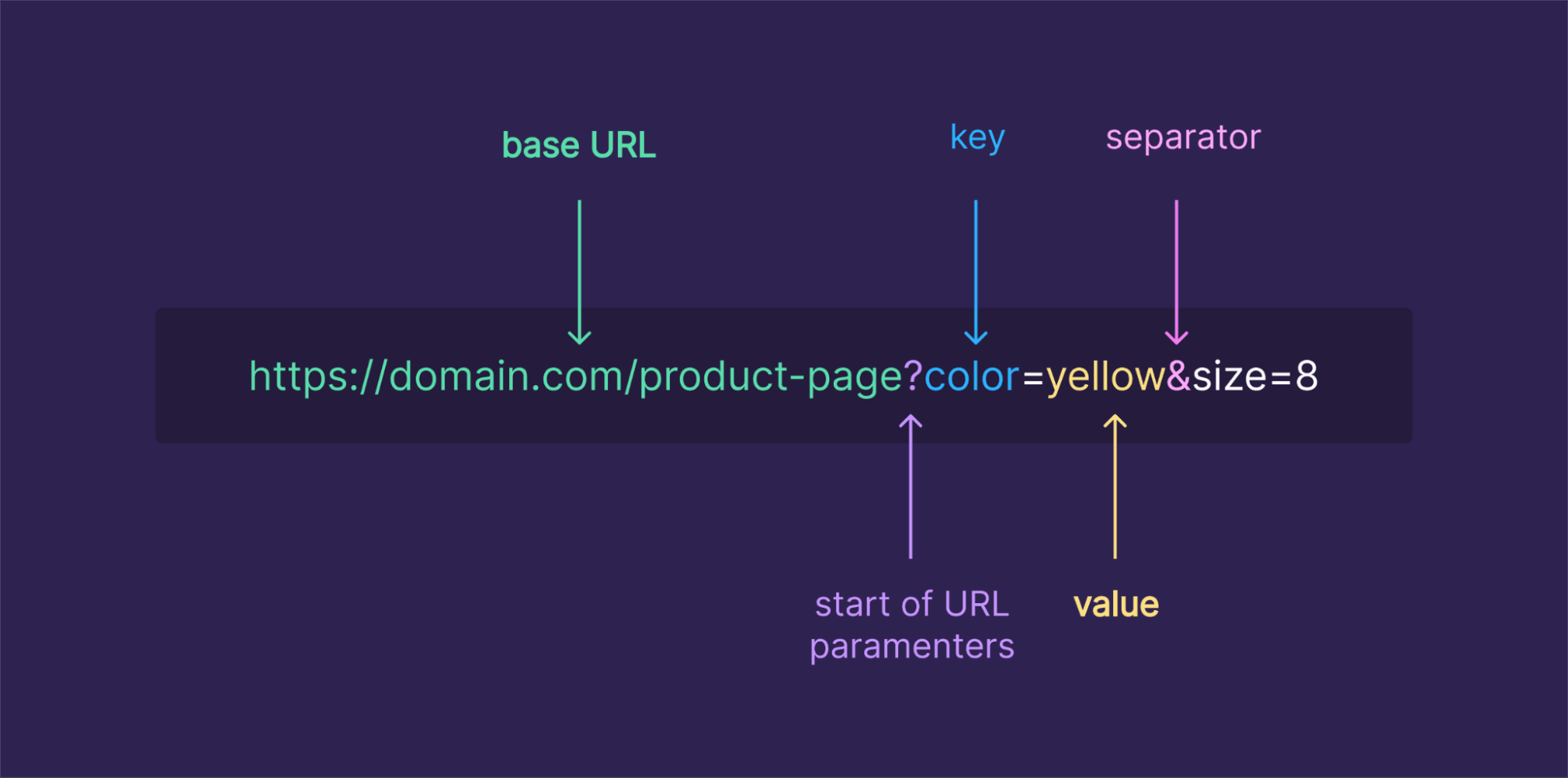
The main purpose of URL parameters is to tell the server, or your analytics tools, extra context about the user’s visit. They might control how content is displayed (like filtering a product list), or they might track how the user arrived, for example, which campaign or ad brought them there.
Now let’s look at a real-life example of a URL with parameters so you can see how it works in practice.
URL parameters example
Imagine you run an online store and want to show only blue shoes, sorted by price from low to high. A link to that filtered list might look like this:
https://yourstore.com/products?category=shoes&color=blue&sort=price_asc
- The base part, https://yourstore.com/products, defines the page resource.
- The part after the ?, category=shoes&color=blue&sort=price_asc, are the URL parameters.
- Here, category=shoes and color=blue tell the store what products you want to see, and sort=price_asc tells it how to order them.
Or say you run a marketing campaign and want to track traffic coming from a newsletter. You might use a “long URL” like this:
https://yourblog.com/landing-page?utm_source=newsletter&utm_medium=email&utm_campaign=november_promo
In this URL:
- utm_source=newsletter shows the traffic came from the newsletter,
- utm_medium=email specifies the medium,
- utm_campaign=november_promo names the campaign.
When someone clicks this link, your analytics tool records exactly where they came from, making it way easier to measure campaigns.
With these examples in mind, you can see how URL parameters turn a basic link into a powerful way to control content or track performance, especially when you’re dealing with long URLs or lots of traffic sources.
Main types of URL parameters
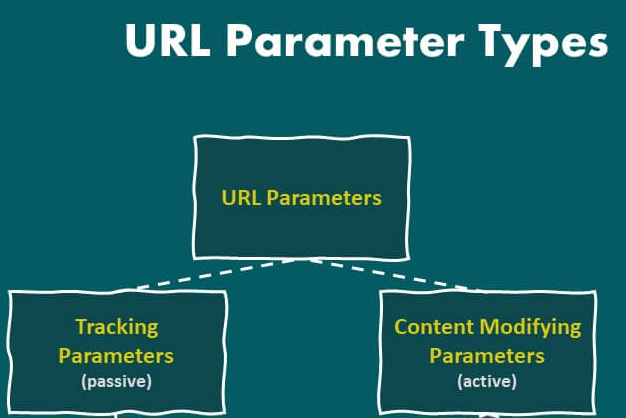
When it comes to URL parameters, most fall into one of two main types. They either alter what you see on the page or silently carry info in the background.
Active URL parameters
Active parameters, also called “content-modifying parameters”, actually change what the visitor sees when they open a link.
For example, if someone visits an online store, active parameters might filter products (?category=shoes&color=blue), sort them (?sort=price_asc), or load a specific page in a list (?page=2).
These parameters directly influence the content or layout of a page, so that the same base address can show totally different content, such as only “blue shoes” or results sorted from cheapest to most expensive.
Passive URL parameters
On the other hand, passive parameters don’t change what you see on the page. They’re used “behind the curtain”. These are mainly used for tracking, analytics, affiliate referrals, or session identifiers.
For instance, when you append something like ?utm_source=newsletter&utm_medium=email&utm_campaign=spring_sale, the page content stays the same, but your analytics tool records where you came from.
Whether those parameters are present or not, visitors see identical content, but the website collects additional context about how the visit occurred.
Understanding this difference, active vs passive parameters, is super helpful when you build links or track campaigns (or even worry about SEO).
How URL parameters work
URL parameters are the little helpers appended to a URL that tell the website or server extra info, often about what content to show, or data to track.
Below is how they’re structured and how that structure actually works under the hood.
Structure & functionality
- Base + query string: A URL starts with the base (like https://example.com/page), and if you want to add parameters, you append a question mark ?. That marks the start of the parameters section.
- Key-value pairs: Each parameter is written as a key and a value separated by an equals sign =. For instance, page=2 or color=blue.
- Multiple parameters: If you have more than one parameter, you separate them with an ampersand &. So after the first ?, every additional parameter is joined with &.
- How the server uses them: When a web server receives a URL with parameters, it reads those key-value pairs and uses them to decide what to send back. This might mean filtering content (e.g., showing only certain items), sorting data, controlling pagination, or tracking things like where the user came from.
- Optional & flexible: Parameters are optional. The URL works without them, but adding them gives extra instructions or context. That’s why you often see parameters used for search queries, page numbers, filters, UTMs for analytics, and more.
With this structure in mind, you can now build URLs that do more than just point to a page. Next up, we’ll show you how to play around with a few handy use cases, like filtering a shop catalog or tracking where your visitors come from.
What are URL parameters used for: Common uses discussed
When you add URL parameters to a link, they open up a lot of useful powers. Instead of just pointing to a page, you can make the page behave differently or carry extra info behind the scenes.
Here are common uses of those parameters:
Sorting
You can use parameters to rearrange content order. For example, on a store or blog, you might let users see “price low → high,” “newest first,” or “alphabetical.” A URL like ?sort=price_asc tells the site how to order the items.
Filtering
Parameters help narrow down big lists to what the user cares about. For instance, showing only “red shirts,” “in-stock items,” or “size = M.” This means users instantly see relevant results without having to browse everything.
Pagination
For long lists (products, articles, search results), parameters like page=2 or page=5 tell the server to send a specific “slice” of the complete list. So instead of a single huge page, the content is broken into manageable sections or pages.
Personalization
Sometimes, parameters help deliver a tailored experience, for example, by remembering a preference or choosing a particular view. They let websites adapt what you see based on your choices or past behavior.
Site search
When users search on a website, the search term is often passed as a query parameter (e.g.,?q=shoes or ?search=keyword). That tells the server what content to look for and return.
Translation (Language selection)
For multilingual sites, parameters can indicate which language/version of the page to show (for instance, ?lang=fr for French). This lets a single base page serve multiple languages without a separate structure.
Describing (Identifiers)
At times, parameters carry identifiers or descriptive data, such as a product ID, SKU, or category ID. That helps the server know exactly which item or content version to serve.
Tracking & analytics
This is one of the most common uses of URL parameters, which lets marketers and site owners track where traffic comes from. With tags like utm_source, utm_medium, or utm_campaign, you can see whether a visitor came via a social post, email, ad, or other channel, hassle-free.
Session management (State storage)
In some web applications, parameters may carry session IDs or state information to help maintain continuity as a user navigates. This way, the server knows who’s making requests and what session they belong to.
In short, URL parameters turn a simple link into a flexible instruction. They help the site tailor content, keep track of user behavior, let people search/filter easily, and manage complex site workflows seamlessly.
The hidden SEO challenges of URL parameters
URL parameters are super valuable and helpful, but if you don’t handle them carefully, they can bring some sneaky SEO problems. Here are the main issues to watch out for:

Duplicate content
When different parameter versions point to essentially the same page, search engines might treat them as separate pages. For example, page.com/shop?sort=price and page.com/shop?utm_source=facebook may have identical content but appear as different pages to bots.
Wasted crawl budget
Search engines only crawl a limited number of URLs per site in a given period. If bots chase dozens (or hundreds) of parameter-generated versions of the same content, they might waste time on those and miss more critical pages.
Keyword cannibalization
When multiple URL-parameter variants of a page target the exact keywords, they can end up competing against each other. Instead of one strong page ranking well, you get several weaker ones fighting for the same spot.
Tracking issues
Parameters used for analytics or tracking (such as UTM tags or session IDs) can cause the same content to appear under multiple URLs. Without proper handling, this can clutter search indexes and obscure which pages actually bring value.
Dilution of page ranking signals
Because links, shares, and other signals might point to different parameterized versions, your content’s overall “authority” gets split. That weakens its SEO potential compared to having a single, clean, SEO-friendly URL.
Overall, these handy little parameters can quietly undermine your SEO if left unmanaged. In the next section, we’ll walk through best practices to avoid these pitfalls, so you get the benefits of parameters without the SEO downside.
10 best SEO practices for using URL parameters
When you use URL parameters on your site (for filters, tracking, sorting, etc.), doing it thoughtfully can help you avoid SEO headaches and keep your site’s health strong.

Below are some smart practices to follow:
1. Add canonical tags
Use a <link rel=”canonical”> tag on parameterized pages to point back to the main “clean” URL version. This tells search engines which URL you want them to index and helps consolidate link equity and ranking signals.
2. Block URLs containing parameters with “robots.txt”
For parameter combinations that don’t add value (like tracking codes, session tokens, or specific filters), you can block crawlers via robots.txt. That helps avoid unnecessary crawling of low-value variants and protects your crawl budget.
3. Avoid URL parameters for localization
For things like language or region versions of your site, it’s often better to use clean, dedicated URLs (like /fr/ for French) instead of parameters. This keeps URLs intuitive and user-friendly, preventing confusion for search engines.
4. Use consistent internal linking
Always link internally to the canonical version of your pages instead of parameterized URLs. That reinforces search engines’ understanding of which version to favor and avoids spreading ranking power across multiple URL variants.
5. Exclude parameterized URLs from audits
When running site audits or SEO crawls, filter out or ignore parameterized URLs, so the audit focuses on your core content. This keeps reports clean and helps you prioritize what really matters.
6. Optimize the sitemap
Make sure your sitemap lists only the canonical, clean URLs, not every parameterized variant. That helps search engines find and index the right pages, and avoid unnecessary duplication.
7. Use user-friendly URLs
Where possible, favor uncluttered, readable URLs over those stuffed with too many parameters. Straightforward or static URLs tend to perform much better in search results and are easier for users to read.
8. Monitor website on a regular basis
Keep an eye on how parameterized URLs are being crawled or indexed. Regular checks help you catch issues like crawl waste, duplicate indexing, or parameter-related SEO problems early.
9. Use meta tags carefully
For pages that aren’t meant to be indexed (like filtered or tracking-parameter pages), consider using noindex (or canonical + robots strategy) rather than letting them be indexed accidentally. That reduces index bloat and preserves your site’s SEO clarity.
10. Limit the use of URL parameters
**Don’t overuse parameters,** only include them when necessary. Too many different parameter combinations can create a flood of URLs that hurt crawl efficiency, index quality, and overall SEO performance.
URL parameters vs query parameters
When you hear “URL parameters” or “query parameters,” people are often talking about the same thing, but there is a subtle difference worth knowing.
Below is a quick breakdown of how these two terms relate and when each is technically more correct.
| Term | What it refers to | Typical usage/meaning |
| Query parameters | The entire bit of text in a URL after the ?, including all the parameters and separators (e.g.,?key1=value1&key2=value2). | It represents the complete package of data being passed (the container for multiple parameters or instructions). |
| URL parameters | The individual key=value pairs inside the query string (e.g., key1=value1, key2=value2). | They specify the actual data or instructions (like filter, sort, tracking info) that the website/server should act on. |
Why are URL parameters important for marketers?
Using URL parameters gives marketers a commanding way to make sense of how people get to their site, and whether marketing campaigns are working or not.
Here’s why they matter so much:
- Accurate campaign attribution: By adding parameters (like utm_source, utm_medium, utm_campaign) to links, you can track exactly where a visitor came from, say an ad, an email, social media, or a blog post. This clarity helps you know which campaigns bring real traffic.
- Better ROI & budget decisions: Since you can see which channels or ads drive visits and conversions, you can allocate your marketing budget more wisely. Investing more where return is highest and cutting under-performing campaigns.
- Deeper insights into user behavior & audience segments: URL parameters help you understand which ad, email, or link led a user to your site, so you can see patterns in real-time. You can analyze which content formats or channels resonate more, or which audience group converts better.
- Campaign performance tracking across channels: Whether you run paid ads, email newsletters, social posts, or influencer links, parameters let you track all of them under the same roof, giving a complete picture of how different channels contribute to traffic and conversions.
- Support for testing & optimization: You can use URL parameters to run A/B tests or compare different creatives, landing pages, or message variations. By tagging links differently, you’ll know which version performs better.
In a nutshell, URL parameters turn blind guesses into data-backed insights, helping marketers make smarter, evidence-based decisions about content, campaigns, and where to invest time or money.
Are URL parameters damaging your website’s rankings?
It’s pretty possible! If URL parameters aren’t handled carefully, they can quietly harm your site’s SEO. Here’s how using parameterized links might be doing more harm than good.
When a page on your site is accessible under multiple URL versions, those variants often appear as distinct pages to search engines, even when the content is the same.
That raises several issues, such as:
- Search engine bots may waste time crawling duplicate content instead of unique, essential pages.
- Link signals (like backlinks or social shares) get spread out across many URLs rather than concentrated on a single “main” URL, and
- The confusion may lead to keyword cannibalization, where multiple variants compete against each other, weakening overall visibility.
Moreover, if parameter-packed URLs get indexed, it can bloat your site’s index, dilute authority, and make it harder for your core pages to rank well. So, it’s better to neglect them, but you can use them if you are sure to manage them correctly.
Summing up
In the end, URL parameters are a powerful tool when used right. They help you tailor content, track campaigns, filter results, and understand precisely how visitors arrive at your site.
But if you’re careless with them, letting duplicate links build up, neglecting canonical tags, or overusing parameterized URLs, they can silently undermine your SEO efforts.
The key is balance!
Use parameters when needed, but keep your site structure clean, and always give search engines a “canonical” version to index.
And, if you want to make sharing, tracking, and managing your links even easier, without messy, long URLs or jumbled analytics, why not give Replug.io (i.e., an all-in-one link optimization platform) a try?
It’s a top‑notch custom URL shortener that can help tidy your links, add tracking, and boost your link game exceptionally!
Frequently asked questions
What is %20 in URL?
%20 represents a space character in a URL. It’s a URL-encoded version of a space, as spaces are not allowed in URLs.
What are the three types of URLs?
The three types of URLs are:
1. Absolute URL: Full URL including the protocol, domain, and path.
2. Relative URL: A shortened URL that assumes the base domain or directory.
3. Root-relative URL: Starts from the root directory and doesn’t include the domain.
How to set params in URL?
URL parameters are added after the base URL, following a question mark (?). Each parameter is in the format, key=value, and multiple parameters are separated by an ampersand (&).
How to put & in a URL?
The & symbol is reserved for separating multiple parameters. To include an ampersand in a parameter value, you should URL-encode it as %26.
What is the difference between URL parameters and query strings?
URL parameters and query strings are essentially the same. Both refer to the part of the URL that starts after the question mark (?), containing key-value pairs.
Which is not a common use of URL parameters?
An everyday use of URL parameters is to pass data between pages (e.g., search queries, form data). However, using these parameters for sensitive data, such as passwords, is not recommended.
Provide the standard URL parameters list?
There’s no official “standard” list, but a common URL parameters array includes:
– utm_source, utm_medium, utm_campaign (for tracking marketing efforts).
– id, page, sort, filter (for pagination or filtering data).